OBD scanning
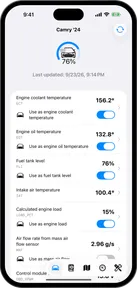
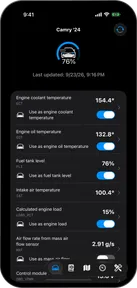
Pelican has a powerful OBD scanner that can reveal the hidden information inside your car.
An OBD scanner lets Pelican show readings from your car that you might not see on its dashboard. OBD scanners plug into the diagnostic port and Pelican typically connects to one over Bluetooth.
Why scan your car?
OBD scanning gives you more information about each drive:
- See live readings. Follow coolant temperature, turbo boost, battery charge or tire pressure on your phone, depending on your car.
- Keep a history. Pelican saves each connection as a scan session. Open the Logbook to review your sessions after a drive.
- Choose what you see. Add OBD parameter widgets to your phone’s map layout or a dashboard.
The available readings depend on your car’s make, model and year. Check your car in the car catalog before buying a scanner for a particular reading.
Scanning safely
Pelican’s everyday scanning reads data from your car. It doesn’t tune the engine or change your car’s settings. You should always set up your scanner and widgets while parked.
The OBD terminal is a power-user feature that lets you send any command to your car, and those commands can change the car’s state.
Before driving, always check that your scanner and any cable are clear of the pedals and your feet.
Leaving a scanner plugged in
Some scanners are designed to stay connected, but this depends on the scanner and your car. The diagnostic port can supply power even when the car is off, so it’s important to be mindful of this if you plan to leave your scanner plugged in 24/7.
Check two things before leaving a scanner connected:
- Power use. The scanner needs a sleep mode that works with your car. A scanner that stays awake can drain the car’s battery.
- Connection security. Check how the scanner controls pairing. A scanner that accepts connections from nearby devices can give someone else access to your car.
For example, OBDLink documents a low-power sleep mode and protected Bluetooth pairing for the CX. Check the instructions for your exact model.
If you’re unsure, unplug the scanner when you leave the car, especially before a long period without driving. An OBD extension cable with a power switch can make this easier. See Unplug the scanner after a drive.
Choose a scanner
Start with a Bluetooth Low Energy (BTLE) scanner confirmed to work with Pelican. These scanners connect from Pelican and work with wireless CarPlay.
The OBDLink CX is one tested BTLE option. Compare it with other models in Tested scanners, including connection type, speed and price. Check the exact model: scanners from the same brand can have different compatibility.
Already have a scanner? Check that list before buying another. When you’re ready, follow Connect an OBD scanner.
- Connect an OBD scannerStart pulling live data from your car with Pelican OBD.
- Tested scannersThe OBD scanners that work with Pelican, how fast they are, and their prices.
- Coming soon
- Extended PIDsRead more car data with OBDb parameter definitions.9 articles
- Coming soon
- Coming soon
- Contribute to the OBDbThe best way to help improve the OBDb is to contribute to it.